Ashampoo Photo Optimizer 8 — Windows, 2 Devices, Lifetime, Global
En stock
Al pagar con Apple Pay o Google Pay: Solicito expresamente recibir mi clave inmediatamente después del pago y reconozco que pierdo mi derecho de desistimiento de 14 días una vez entregada. Mientras no muestre la clave, puedo pedir un reembolso, y la garantía de entrega cubre las claves que no funcionen.
Vendido por Get it Cheap, LLC · ¿Es legítimo?
- Clave en tu cuentaSe entrega automáticamente cuando se confirma el pago.
- Guía de instalaciónInstalación y activación paso a paso, junto a tu clave.
- ¿No se activa?Avísanos en 14 días y la sustituimos o te devolvemos el dinero · Política de reembolsos
Descripción
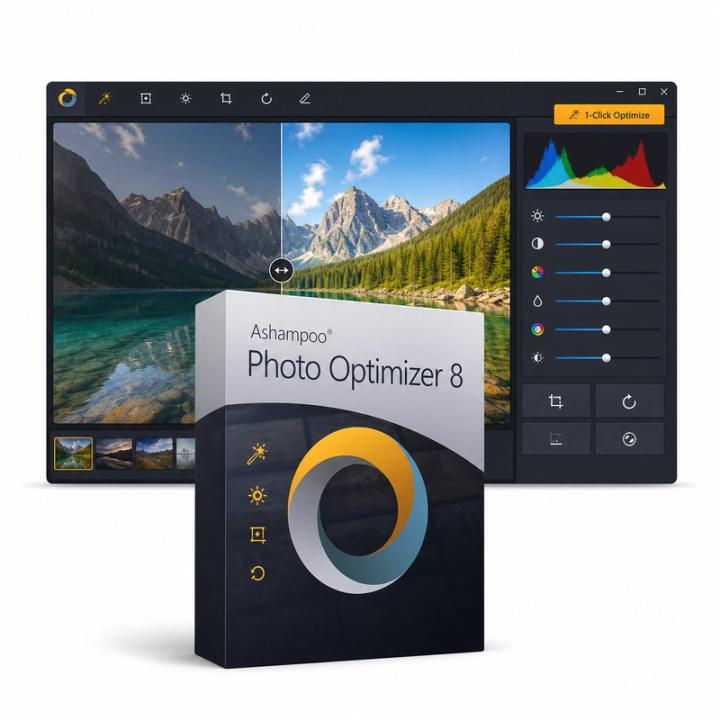
For straightforward photo corrections with an automatic starting point and room for manual adjustment. Ashampoo Photo Optimizer 8 improves photos automatically with one click, correcting exposure, contrast, colour temperature and sharpness, and offers manual controls for noise reduction, perspective correction, red-eye removal, cropping and rotation. Several photos can be optimised in one batch, and a before/after view compares the result with the original. Automatic optimisation offers a quick starting point when a photograph looks dull, uneven or otherwise needs basic improvement. Manual adjustments then provide a way to change the result according to the image’s intended appearance. Cropping can remove distracting edges, while rotation corrects orientation or framing. This is useful when preparing personal photographs or a group of images for sharing and you want a direct correction workflow rather than a complex design workspace. An automatic result is a suggestion, not an objective definition of how the picture should look. Compare colours, skin tones and contrast with the original, especially when the photograph has an intentional lighting mood. Keep a source copy and inspect the image at its intended output size. Features differ between the named releases, so newer tools should not be assumed. This offer is a lifetime licence for two Windows devices.
Características
- One-click auto optimisation
- Noise reduction and colour temperature
- Perspective correction
- Red-eye removal, crop and rotate
- Batch optimisation
Especificaciones
- Plataforma
- Windows
- Dispositivos
- 2 PCs
- Restricciones regionales
- Global
- Duración
- De por vida
Global significa que vendemos esta clave sin bloqueo regional. El fabricante puede, aun así, restringir su uso en algunos países según sus propias condiciones.
De por vida significa que la licencia no caduca. No significa que el fabricante siga actualizando o dando soporte a esta versión; eso puede terminar antes.
FAQ
¿Qué métodos de pago puedo usar?
Aceptamos las principales tarjetas de crédito y débito a través de Stripe. PayPal también está disponible cuando se ofrece al pagar. No vemos ni guardamos el número completo de tu tarjeta.
¿Puedo obtener una factura?
Sí. Abre el pedido en tus pedidos y descarga la factura en PDF.
¿Hay restricciones regionales?
Algunos productos solo funcionan en ciertas regiones. La página del producto lo indica bajo el precio y en la pestaña Especificaciones. Si tienes dudas, contacta con soporte antes de comprar.
¿Cuándo recibiré mi dinero?
Cuando se aprueba un reembolso, lo enviamos en 48 horas. El tiempo que tarda el reembolso en aparecer en tu extracto depende de tu banco o del emisor de la tarjeta; suelen ser unos pocos días hábiles.
¿Cómo contacto con soporte?
Con la sesión iniciada, abre un ticket en Soporte de tu cuenta o desde la página del pedido con «Contactar con soporte». Incluye tu número de pedido y lo ocurrido. Respondemos por email.
¿Qué debo incluir en una solicitud de soporte?
Tu número de pedido, el nombre del producto, lo que estabas haciendo y una captura de cualquier error. Cuanto más sepamos, antes podremos ayudarte.